JSON Online Formatter: The Ultimate Free JSON Formatter Tool & JSON Format Fixer Guide (2026)

Table of Contents
- Why You Need a JSON Online Formatter
- What is a JSON Formatter Tool?
- Key Benefits of Using JSON Format Fixer
- How to Use JSON Online Formatter
- Common JSON Errors & How to Fix Them
- Essential Features of Best JSON Formatter Tools
- Privacy & Security Considerations
- Best Practices for JSON Formatting
- Frequently Asked Questions
If you are a developer or work with APIs regularly, you already know how important JSON (JavaScript Object Notation) is. But when JSON data is unformatted or broken, it can take hours to debug. This is exactly where a reliable JSON Online Formatter makes your life much easier!
In today's digital era, a JSON Formatter Tool has become every developer's best friend. Whether you are debugging API responses, checking config files, or trying to understand a complex nested structure — a powerful JSON Format Fixer saves your time and catches errors instantly.
In this comprehensive guide, I will share from 15+ years of web development experience how you can master JSON formatting. Let's get started!
What is a JSON Formatter Tool and What Does it Do?
A JSON Online Formatter is basically a web-based tool that converts your raw, unreadable JSON data into a beautifully formatted, easily readable structure. This is not just beautification — it is validation too!
Imagine you have this JSON:
{"users":[{"id":1,"name":"Rahul","email":"rahul@example.com","address":{"city":"Delhi","pincode":"110001"}},{"id":2,"name":"Priya","email":"priya@example.com","address":{"city":"Mumbai","pincode":"400001"}}],"status":"active"}Can you find any error in this? It is difficult, right! Now look when this same JSON is properly formatted:
{
  "users": [
    {
      "id": 1,
      "name": "Rahul",
      "email": "rahul@example.com",
      "address": {
        "city": "Delhi",
        "pincode": "110001"
      }
    },
    {
      "id": 2,
      "name": "Priya",
      "email": "priya@example.com",
      "address": {
        "city": "Mumbai",
        "pincode": "400001"
      }
    }
  ],
  "status": "active"
}
Now the structure is clearly visible! Nested objects, arrays, and relationships can be understood at a glance. This is the magic of JSON Formatter Tool!
Benefits of Using JSON Format Fixer
1. Instant Error Detection
The most important benefit is that JSON Format Fixer instantly catches syntax errors. Missing brackets, trailing commas, unquoted keys — everything gets highlighted with the exact line number. Trust me, this saves you hours of time!
2. Better Code Readability
When you work in a team, formatted JSON makes code reviews 10 times faster. Reviewers can easily understand the structure and provide meaningful feedback.
3. Speed in Debugging
According to my experience, properly formatted JSON reduces debugging time by up to 70%. You can instantly spot issues in nested objects which is impossible with unformatted JSON.
Pro Tip: 2-Space Indentation
Most professional teams use 2-space indentation. It is both compact and readable. Follow your team's style guide, but consistency is most important!
4. Data Validation
A good JSON Online Formatter does not just beautify — it also checks validity.
Invalid values like undefined, NaN, or comments — all get caught
before they go to production.
How to Use JSON Online Formatter?
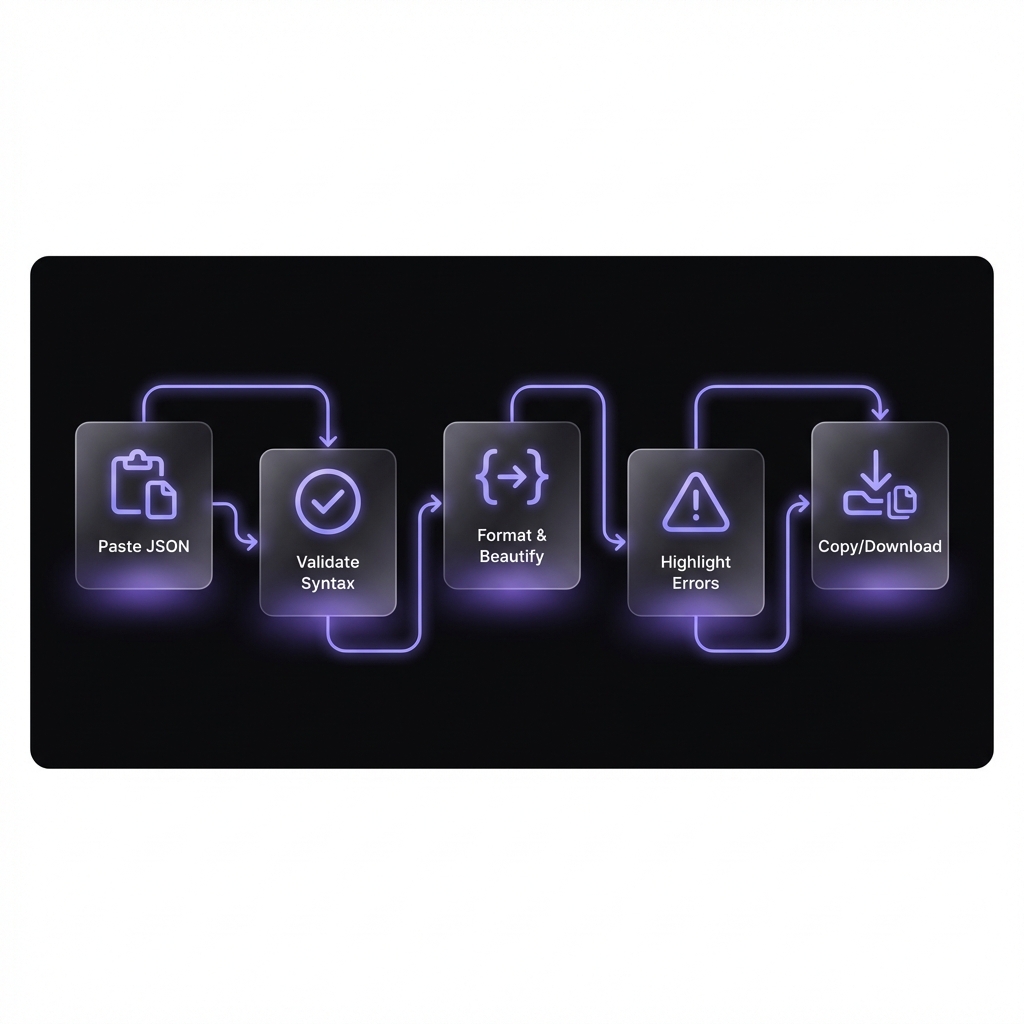
Using our JSON Formatter Tool is very simple. Follow these steps:
- Paste Your JSON: Paste your raw JSON in the input area on the left side
- Click Format: Press the "Format" button or enable automatic formatting
- Review Output: See beautifully formatted JSON on the right side
- Copy or Download: One-click copy or download the .json file
Bonus features like tree view, syntax highlighting, and error messages give you complete control.
Try Our Free JSON Online Formatter
100% client-side processing, zero data upload. Format and fix JSON instantly — completely free!
Open JSON Formatter ToolMost Common JSON Errors and Their Solutions
In over 15 years I have seen developers making these mistakes. With JSON Format Fixer all of these are easily caught:
1. Trailing Commas
Valid in JavaScript, but not in JSON!
// ❌ WRONG - Trailing comma
{
  "name": "Amit",
  "age": 25,  // <-- This comma is INVALID!
}

// ✅ CORRECT - No trailing comma
{
  "name": "Amit",
  "age": 25
}
2. Single Quotes
JSON strictly requires double quotes. Single quotes will give "Unexpected token" error.
3. Unquoted Keys
Every key must be in quotes: "name" not name
4. Comments
Comments are not allowed in standard JSON. If you need comments, use JSON5 or JSONC format.
Common Mistake Alert!
API responses often have special characters like newlines or tabs. These must be properly
escaped: \n, \t etc. Our JSON Format Fixer
automatically detects these.
What Features Should the Best JSON Formatter Tools Have?
There are many tools in the market, but professional-grade JSON Online Formatter should have these features:
- Client-Side Processing: Your data should never go to a server. This is critical for privacy!
- Real-Time Validation: Errors should show while typing with exact line numbers
- Large File Support: 50MB+ files should be handled without crashing
- Customizable Indentation: 2-space, 4-space, or tabs — all options should be available
- Tree View Mode: Collapsible tree view for exploring deeply nested JSON
- Syntax Highlighting: Color-coded keys and values for quick scanning
- One-Click Copy: Formatted output instantly to clipboard
Privacy and Security: Why Client-Side Tools are Best?
This is a very important point that people ignore. When you paste sensitive data — like API keys, user information, or database responses — in any online tool, pay attention to where that data is going!
In our JSON Formatter Tool:
- 100% client-side JavaScript processing
- Zero data upload to any server
- Works completely offline once loaded
- No analytics on your JSON content
These features are essential for enterprise environments where data privacy is paramount.
JSON Formatting Best Practices
Consistent Indentation
Decide one style for the team — whether 2 spaces or 4. Mixed indentation makes code reviews a nightmare.
Key Sorting for Diffs
Alphabetically sorted keys keep git diffs clean and reduce merge conflicts. This is especially useful for config files.
Minify for Production
Formatted in development, but minified in production. This can reduce file size by up to 40%!
Validate Before Deployment
Always validate with JSON Format Fixer before pushing to production. A missing bracket can crash the entire application.
Frequently Asked Questions
Q: Is the JSON Online Formatter free to use?
Yes! Our JSON Formatter Tool is completely free with no limits. You can format unlimited JSON data without any signup or registration required.
Q: Is my data safe when using this tool?
Absolutely! Our JSON Format Fixer uses 100% client-side processing. Your data never leaves your browser and is never uploaded to our servers. You can confidently paste sensitive data without any privacy concerns.
Q: What is the maximum file size I can process?
Our JSON Online Formatter can easily handle files up to 50MB+. The tool is optimized using streaming techniques and web workers to process large files without crashing your browser.
Q: Can I use this tool on mobile devices?
Yes, our tool is fully responsive and works perfectly on phones and tablets. The touch-friendly interface ensures a smooth formatting experience on any device.
Q: What is the difference between JSON and XML?
JSON is lightweight and human-readable compared to XML. Modern APIs prefer JSON because parsing is faster and the syntax is simpler. XML is more verbose with additional overhead for tags and attributes.
Q: How do I fix trailing comma errors in JSON?
Simply remove the comma after the last item in an array or object. Our JSON Format Fixer automatically highlights these errors with the exact line number, making them easy to locate and fix!
Conclusion: Upgrade Your JSON Workflow
If you are a developer, a reliable JSON Online Formatter should be in your toolkit. This is not just convenience — it is productivity, error prevention, and professional code quality.
Try our free JSON Formatter Tool and see how much time it saves. With features like real-time validation, JSON Format Fixer capabilities, and 100% privacy — this tool will become your new best friend!
Ready to Format Your JSON?
Paste your messy JSON and get clean, validated output in seconds. Free forever, no signup required!
Try JSON Formatter Now