CSS Formatter Online: The Ultimate Free CSS Beautifier & Code Formatter Guide (2026)
Table of Contents
If you are a web developer or work on frontend projects, you already know how messy CSS (Cascading Style Sheets) can become. Minified CSS or poorly indented stylesheets can turn debugging into a nightmare. This is exactly where a powerful CSS Formatter Online makes your life much easier!
In today's modern web development, writing clean and organized CSS code is not just good practice — it is essential. Whether you are maintaining legacy code, debugging minified CSS, or collaborating with a team — a reliable CSS Beautifier is your secret weapon for success.
In this comprehensive guide, I will share from 15+ years of frontend development experience how you can master CSS formatting and take your productivity to the next level!
What is CSS Formatting and Why is it Important?
A CSS Formatter Online is basically a web-based tool that converts your unreadable, minified, or messy CSS code into a clean, properly indented, and organized structure. It improves readability and makes debugging super fast.
Look at how unreadable this CSS appears:
.header{display:flex;justify-content:space-between;align-items:center;padding:20px 40px;background:linear-gradient(135deg,#667eea 0%,#764ba2 100%);}.nav-links{display:flex;gap:30px;}.nav-links a{color:#fff;text-decoration:none;font-weight:500;transition:opacity 0.3s;}Can you easily find any property in this? Absolutely not! Now look at the same CSS properly formatted:
.header {
    display: flex;
    justify-content: space-between;
    align-items: center;
    padding: 20px 40px;
    background: linear-gradient(135deg, #667eea 0%, #764ba2 100%);
}

.nav-links {
    display: flex;
    gap: 30px;
}

.nav-links a {
    color: #fff;
    text-decoration: none;
    font-weight: 500;
    transition: opacity 0.3s;
}
Now every property is clearly visible! Selectors, properties, and values can be understood at a glance. This is the magic of CSS Formatter Online!
Major Benefits of Using CSS Beautifier
1. Instant Readability Improvement
The most important benefit is that CSS Beautifier instantly makes messy code readable. With proper indentation, line breaks, and spacing, code scanning becomes literally 10x faster.
2. Faster Debugging
When you are fixing production bugs and encounter minified CSS, formatted CSS reduces debugging time by up to 80%. Properties can be spotted instantly!
3. Better Team Collaboration
Consistent formatting is essential in team projects. When everyone follows the same style — whether 2 spaces or 4 spaces indentation — code reviews become smooth and merge conflicts are reduced.
Pro Tip: Consistent Indentation
Most professional teams use 2-space or 4-space indentation. The important thing is that the entire team follows the same style. Our CSS Formatter supports both options!
4. Code Quality Improvement
With formatted CSS you can easily spot duplicate properties, unused selectors, and inefficient code. This naturally develops the habit of writing cleaner code.
How to Use CSS Formatter Online?
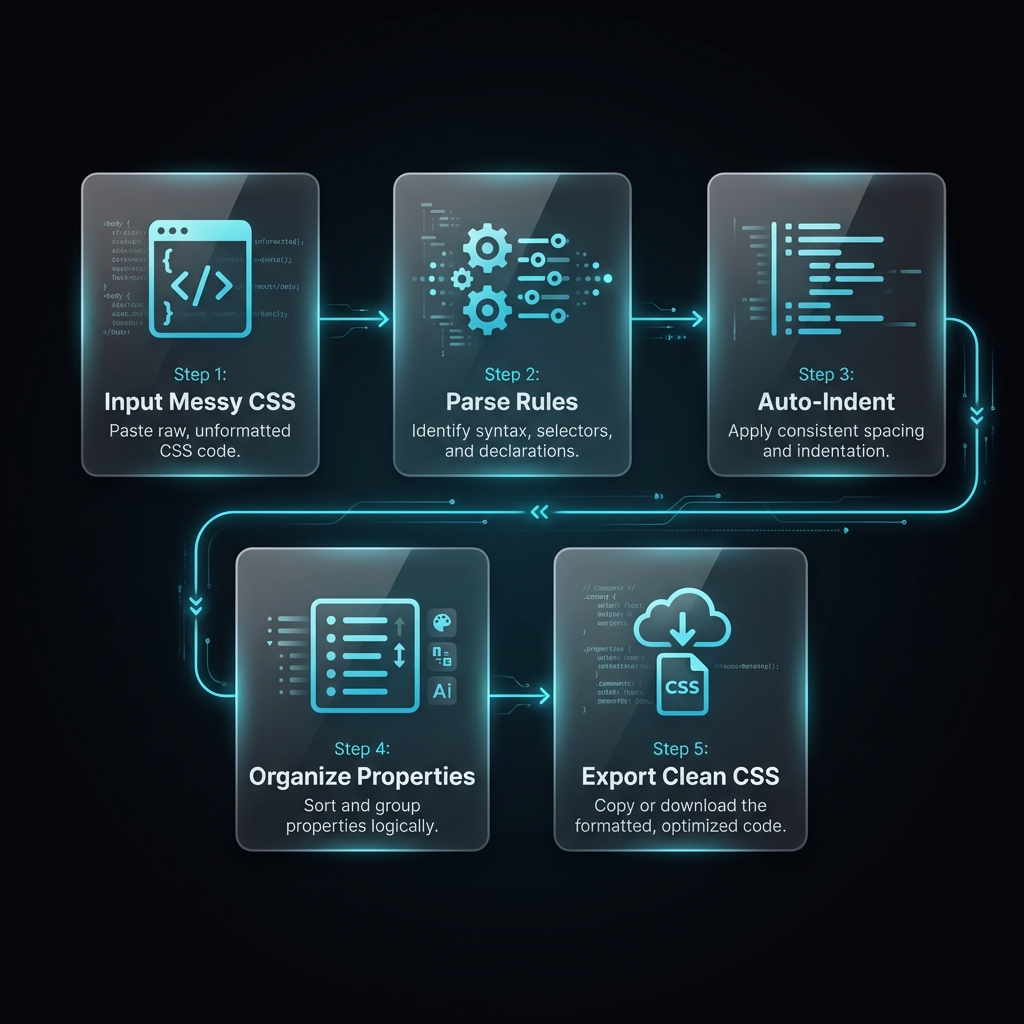
Using our CSS Formatter Online tool is very simple:
- Paste Your CSS: Paste your messy CSS in the input area on the left side
- Choose Settings: Select indentation (2 spaces, 4 spaces, tabs)
- Click Format: Click the "Format" button
- Copy Output: One-click copy the beautifully formatted CSS
Additional features like syntax highlighting, error detection, and download option are also available.
Try Our Free CSS Formatter Online
100% client-side processing, zero data upload. Beautify your CSS instantly — completely free!
Open CSS Formatter ToolCommon CSS Mistakes and Their Solutions
In 15+ years of experience I have seen developers making these mistakes. A good CSS Beautifier easily catches all of these:
1. Missing Semicolons
In CSS, a semicolon after every property is mandatory (optional after the last property but recommended).
/* ❌ WRONG - Missing semicolon */
.box {
    color: red
    background: blue;  /* This will break! */
}

/* ✅ CORRECT */
.box {
    color: red;
    background: blue;
}
2. Unclosed Brackets
The count of opening and closing curly braces must match. A missing bracket can break your entire stylesheet!
3. Invalid Property Values
Wrong units or typos like pxl instead of px prevent styles from being applied.
4. Specificity Issues
Proper formatting makes selector specificity clearly visible, which helps in debugging CSS cascade problems.
Common Mistake Alert!
Writing vendor prefixes in proper order is important. The standard property should always come
last:
-webkit-, -moz-, then standard. Our CSS Formatter
automatically organizes this!
What Features Should the Best CSS Formatter Tools Have?
There are many tools in the market, but professional-grade CSS Formatter Online should have these essential features:
- Client-Side Processing: Your code should never be uploaded to a server — privacy first!
- Customizable Indentation: 2-space, 4-space, and tabs — all options should be available
- Syntax Highlighting: Color-coded selectors, properties, and values
- Error Detection: Missing semicolons and brackets should be automatically detected
- Minify Option: Minification should also be available along with formatting
- Large File Support: Large stylesheets should be handled without performance issues
- One-Click Copy: Formatted output instantly to clipboard
CSS Formatting Best Practices
Consistent Property Order
Write properties in logical order — positioning first, then display, box model, typography, and finally visual properties. This makes scanning much faster.
Use Shorthand Properties
When possible, use shorthand: margin: 10px 20px instead of separate top, right,
bottom, left declarations.
Group Related Selectors
Keep related styles together — for example, all button styles in one section.
Add Comments for Sections
Use section comments in large stylesheets: /* === HEADER STYLES === */
Frequently Asked Questions
Q: Is the CSS Formatter Online free to use?
Yes! Our CSS Beautifier is completely free with no limits. You can format unlimited CSS code without any signup or registration required.
Q: Is my CSS code safe and private?
Absolutely! Our CSS Formatter Online uses 100% client-side processing. Your code never leaves your browser and is never uploaded to our servers. Perfect for proprietary stylesheets!
Q: Can I customize the indentation style?
Yes! Our tool supports 2-space, 4-space, and tab indentation. Choose whatever matches your team's coding standards or personal preference.
Q: Can I use this tool on mobile devices?
Yes, our tool is fully responsive and works perfectly on phones and tablets. The touch-friendly interface ensures a smooth experience on any device.
Q: What's the difference between formatting and minifying CSS?
Formatting adds indentation and line breaks for readability (for development). Minifying removes all unnecessary characters to reduce file size (for production). We offer both options!
Q: How large CSS files can I process?
Our CSS Formatter Online can handle files up to 10MB+ without any performance issues. The tool is optimized for processing large enterprise stylesheets efficiently.
Conclusion: Level Up Your CSS Workflow
If you are a frontend developer, a reliable CSS Formatter Online should be in your essential toolkit. This is not just about making code pretty — it is about productivity, debugging speed, and professional code quality.
Try our free CSS Beautifier and experience how much time it saves. With features like real-time formatting, customizable indentation, and 100% privacy — this tool will transform your CSS workflow!
Ready to Format Your CSS?
Paste your messy CSS and get clean, organized code in seconds. Free forever, no signup required!
Try CSS Formatter Now