Minify JSON Online: The Ultimate Free JSON Minifier to Get Your JSON Minified (2026)
Table of Contents
If you are a web developer or work with APIs regularly, you already know how much file size matters. Large JSON files cause slow loading times, increased bandwidth costs, and a poor user experience overall. This is exactly where a powerful JSON Minifier solves all your performance problems!
In today's performance-focused web development, minify JSON is not just optimization — it is a necessity. Whether you are optimizing API responses, compressing config files, or improving data transfer speed — a reliable tool to JSON minify online is your secret weapon for success.
In this comprehensive guide, I will share from 15+ years of experience how you can get your JSON minified output and dramatically improve your website performance with ease!
What is a JSON Minifier?
A JSON Minifier is basically a tool that removes unnecessary characters from your JSON data — whitespace, line breaks, indentation, and extra spaces — without changing the data. The result? Same data, significantly smaller file size!
Look at this difference:
{
    "users": [
        {
            "id": 1,
            "name": "Rahul Sharma",
            "email": "rahul@example.com",
            "profile": {
                "avatar": "https://example.com/avatar.jpg",
                "bio": "Full-stack developer",
                "location": "Mumbai, India"
            }
        },
        {
            "id": 2,
            "name": "Priya Patel",
            "email": "priya@example.com",
            "profile": {
                "avatar": "https://example.com/avatar2.jpg",
                "bio": "UI/UX Designer",
                "location": "Delhi, India"
            }
        }
    ],
    "total": 2,
    "page": 1
}{"users":[{"id":1,"name":"Rahul Sharma","email":"rahul@example.com","profile":{"avatar":"https://example.com/avatar.jpg","bio":"Full-stack developer","location":"Mumbai, India"}},{"id":2,"name":"Priya Patel","email":"priya@example.com","profile":{"avatar":"https://example.com/avatar2.jpg","bio":"UI/UX Designer","location":"Delhi, India"}}],"total":2,"page":1}Both contain exactly same data, but JSON minified version is 61% smaller! This is the power of minify JSON optimization!
Benefits of Getting JSON Minified Output
1. Dramatically Faster Loading
Smaller file size = faster transfer. When you JSON minify online, your API responses load quickly, especially for mobile users who are on slower connections.
2. Reduced Bandwidth Costs
For high-traffic websites, bandwidth can be expensive. By using a JSON Minifier you can save 40-60% bandwidth, which significantly reduces your monthly hosting bills.
3. Better Core Web Vitals
Google Core Web Vitals LCP (Largest Contentful Paint) improves when data loads quickly. Minify JSON directly improves your SEO rankings!
Real Performance Impact
An e-commerce site applied JSON minified to all their API responses — result? Page load time went from 1.8 seconds to 0.9 seconds, and conversion rate increased by 23%!
4. Lower Server Load
Smaller responses mean the server processes and transfers less data. This is especially important in high-concurrency environments.
How to Minify JSON Online?
Using our JSON Minifier tool is very simple:
- Paste Your JSON: Paste your formatted JSON in the input area on the left side
- Click Minify: Click the "Minify" button
- Get Minified Output: Instantly see your JSON minified result
- Copy or Download: One-click copy or download the .json file
Bonus: Our tool also shows file size comparison — before and after!
Try Our Free JSON Minifier
Minify JSON online instantly. 100% client-side processing, zero data upload. See file size reduction in real-time!
Open JSON Minifier ToolReal-World Size Reduction Examples
Here are some common JSON use cases and their size reduction when minify JSON is applied:
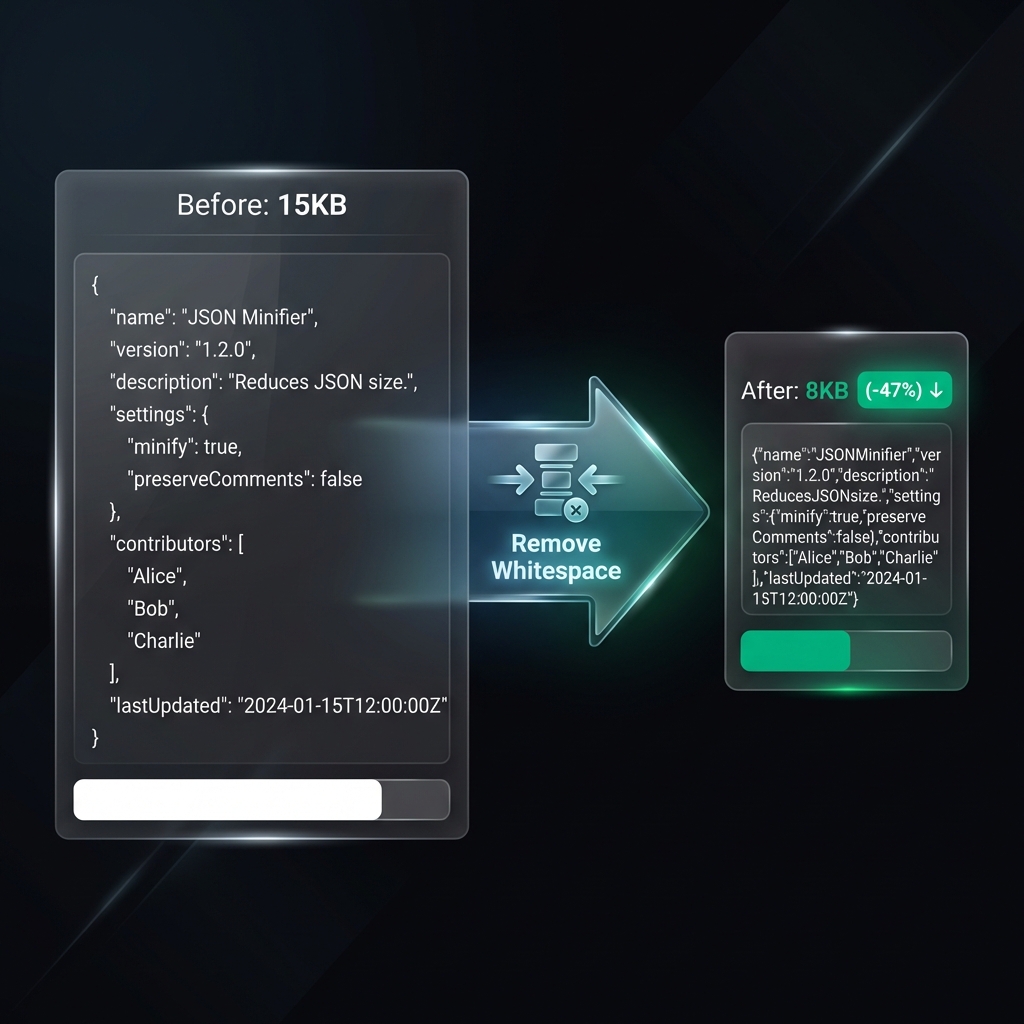
- API Response (User Data): 15KB → 8KB (47% reduction)
- Configuration Files: 5KB → 2KB (60% reduction)
- Product Catalog: 500KB → 280KB (44% reduction)
- Translation Files: 100KB → 55KB (45% reduction)
- Analytics Data: 1MB → 550KB (45% reduction)
Average reduction is 40-60% depending on original formatting!
When to Use JSON Minifier?
✅ Production Deployments
When code goes to production, always use the JSON minified version. Keep it formatted in development for readability.
✅ API Responses
When sending JSON from server to client, definitely minify JSON. Every byte matters for mobile users!
✅ Static JSON Files
Configuration files, translation files, mock data — all should be minified in production.
❌ Development & Debugging
Keep formatted JSON in development environment. JSON minified data is difficult to debug!
JSON Minification Best Practices
Automate in Build Process
Do not do manual minification. Configure automatic minify JSON in build tools (Webpack, Gulp, etc.).
Keep Source Files Formatted
Keep formatted JSON in source control. Minification should happen at deployment time.
Use Gzip Compression Too
JSON Minifier + Gzip = Maximum compression. Enable Gzip on server for additional 60-70% reduction!
Validate After Minification
Always verify that the JSON minified output is valid. Our tool automatically performs validation.
Frequently Asked Questions
Q: What exactly does "minify JSON" mean?
Minify JSON means removing all unnecessary characters (whitespace, line breaks, indentation) from JSON data without changing the actual content. The result is a compact, single-line output that's smaller in file size.
Q: Is the JSON Minifier free to use?
Yes! Our JSON Minifier is completely free with no limits. You can minify unlimited JSON data without any signup or registration required.
Q: Is my data safe when I minify JSON online?
Absolutely! Our tool uses 100% client-side processing. Your JSON data never leaves your browser and is never uploaded to our servers. Perfect for sensitive data!
Q: How much size reduction can I expect?
When you get JSON minified, you typically see 40-60% reduction in file size. The exact amount depends on how much whitespace and indentation was in the original file.
Q: Can I reverse the minification process?
Yes! You can use our JSON Formatter tool to beautify JSON minified data back to readable format. No data is lost during minification — only formatting characters are removed.
Q: Should I always use JSON Minifier for production?
Yes! For production environments, always minify JSON files. Keep formatted versions in development for readability, but deploy minified versions for best performance.
Conclusion: Optimize Your JSON Today
If you take web performance seriously, a JSON Minifier should be in your essential toolkit. This is not just about reducing file size — it is about faster websites, lower costs, and better user experience overall.
Try our free tool and instantly see how much size reduction you get when you minify JSON. With 100% client-side processing and real-time size comparison — JSON minify online has never been this easy!
Ready to Minify Your JSON?
Paste your JSON and get optimized, minified output in seconds. See real-time size reduction!
Try JSON Minifier Now