Password Generator Online: The Complete Guide to Strong & Secure Passwords (2026)

Table of Contents
In an era where data breaches expose billions of credentials annually, password security isn't optional—it's essential. According to Verizon's 2025 Data Breach Report, over 80% of hacking-related breaches involve weak or stolen passwords. Yet most people still use passwords that can be cracked in seconds.
Our free online Password Generator creates cryptographically secure passwords using the Web Crypto API—the same technology used by banks and governments. This comprehensive guide will teach you not just how to generate strong passwords, but why certain passwords fail and how attackers exploit them.
Anatomy of a Strong Password
A truly secure password has four essential characteristics:
1. Sufficient Length
Length is the most important factor in password security. Each additional character exponentially increases the time required to crack the password:
// Time to crack (assuming 10 billion guesses/second)
8 characters  → ~2.5 hours
12 characters → ~200 years
16 characters → ~1 trillion years
20 characters → Practically impossible
2. Character Variety
Using different character types massively increases the search space:
- Lowercase only: 26 possibilities per character
- + Uppercase: 52 possibilities per character
- + Numbers: 62 possibilities per character
- + Symbols: 95+ possibilities per character
3. True Randomness
Human-generated passwords follow predictable patterns. We tend to capitalize the first letter, put
numbers at the end, and substitute letters with obvious numbers (a→4, e→3). Our generator uses
crypto.getRandomValues()—a cryptographically secure random number generator that produces
truly unpredictable sequences.
4. Uniqueness
Every account should have a unique password. When one service is breached, attackers immediately try those credentials on other platforms—a technique called credential stuffing.
The Golden Rule of Passwords
Never reuse passwords across accounts. A single breach can compromise all your accounts if you use the same password everywhere. Use a password manager to generate and store unique passwords for every service.
Generate a Secure Password Now
Create uncrackable passwords instantly. Customizable length, characters, and bulk generation.
Open Password Generator →How to Use Our Password Generator
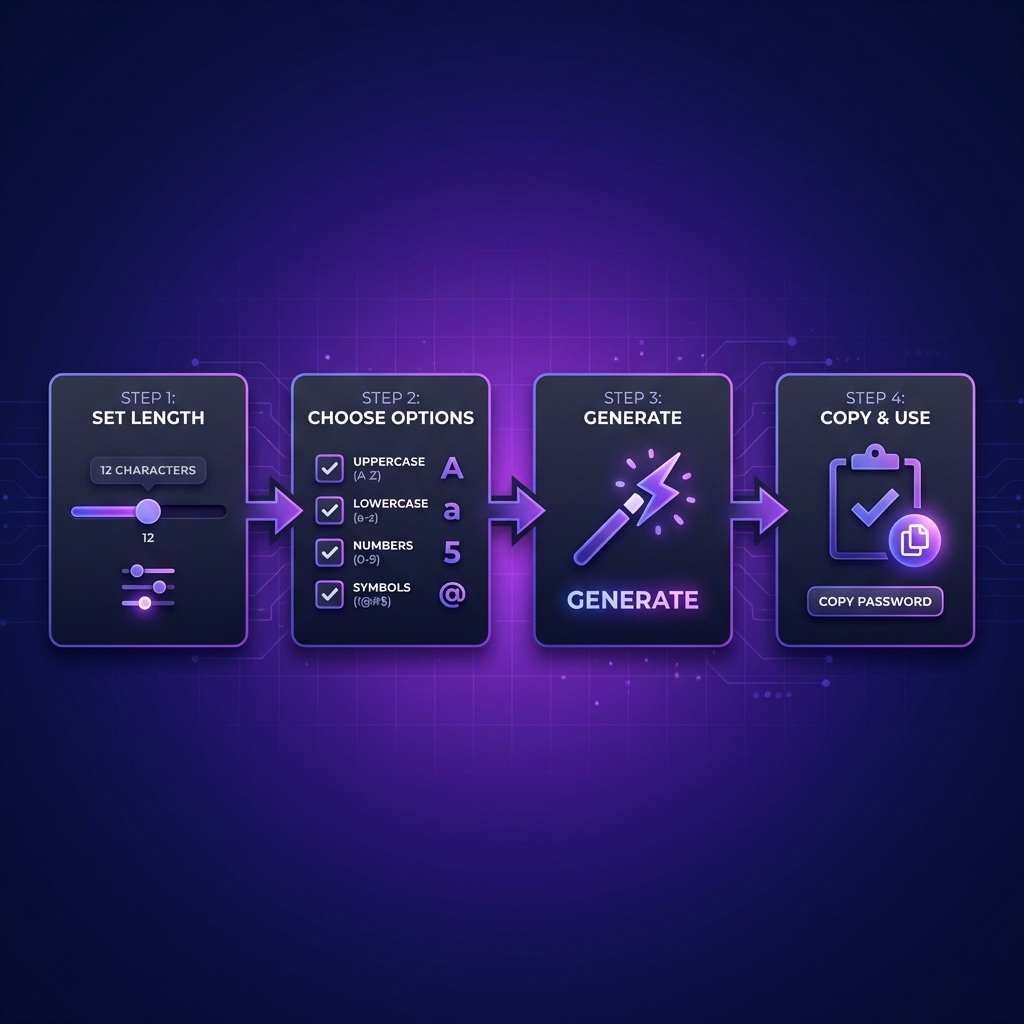
Creating secure passwords takes just seconds:
Step 1: Set Password Length
Use the slider to select your desired length. We recommend 16 characters minimum for standard accounts and 20-24 characters for high-security accounts like banking or email.
Step 2: Choose Character Options
Select which character types to include:
- Uppercase (A-Z): Always recommended
- Lowercase (a-z): Always recommended
- Numbers (0-9): Always recommended
- Symbols (!@#$%...): Use when allowed by the service
Step 3: Generate Password
Click the Generate button. The password appears instantly with a strength meter showing exactly how secure it is.
Step 4: Copy and Store Securely
Copy the password with one click and immediately save it in your password manager. Never write passwords on paper or store them in unencrypted files.
Understanding Password Entropy
Entropy measures the unpredictability of a password in bits. Higher entropy = harder to crack:
// Entropy = log2(pool_size^length)

Password: "password"
Pool: 26 (lowercase only)
Length: 8
Entropy: log2(26^8) = 37.6 bits (Weak!)

Password: "K9#mP$2xYq@nL5vR"
Pool: 95 (all printable ASCII)
Length: 16
Entropy: log2(95^16) = 105.1 bits (Excellent!)
Security experts recommend minimum 80 bits of entropy for passwords protecting valuable accounts.
Common Password Attack Methods
Brute Force Attacks
Attackers try every possible combination. Modern GPUs can test billions of combinations per second. This is why length matters so much—each character multiplies the total combinations.
Dictionary Attacks
Attackers use lists of common words, names, and previously leaked passwords. "Sunshine123" might seem clever, but it's in every password dictionary.
Rainbow Table Attacks
Pre-computed tables of password hashes. Adding random characters (salt) breaks this attack, which is why random passwords are essential.
Social Engineering
Attackers research your social media to guess passwords based on pet names, birthdays, favorite teams, etc. Random passwords eliminate this vulnerability entirely.
Password Managers: Essential Security
With unique 20+ character passwords for every account, you need a password manager:
- 1Password: Best overall UX and security features
- Bitwarden: Best free option, open source
- Dashlane: Great for beginners, includes VPN
- KeePassXC: Best for privacy purists, fully offline
Your Master Password
Use a memorable but long passphrase for your password manager. Something like "correct horse battery staple" (from XKCD) offers both memorability and security. Make it at least 5-6 random words.
Two-Factor Authentication (2FA)
Even the strongest password can be phished. 2FA adds a second verification layer:
- Hardware Keys (YubiKey): Most secure, phishing-proof
- Authenticator Apps (Authy, Google Authenticator): Very secure
- SMS Codes: Better than nothing, but vulnerable to SIM swapping
Enable 2FA on every account that supports it—especially email, banking, and social media.
Common Password Mistakes to Avoid
- Using personal info: Birthdays, pet names, and anniversaries are easily guessable
- Keyboard patterns: "qwerty123" and "asdfgh" are in every dictionary
- Simple substitutions: "p@ssw0rd" doesn't fool modern cracking tools
- Reusing passwords: One breach compromises all your accounts
- Sharing via text/email: Use password manager sharing features instead
- Writing on sticky notes: Physical security matters too
Privacy & Security
Our Password Generator processes everything 100% client-side. Your passwords are
generated using JavaScript's crypto.getRandomValues() directly in your browser. Here's what
that means:
- No server transmission: Passwords never leave your device
- No logging: We can't see what you generate
- No recovery: We can never retrieve your passwords
- Works offline: Use it without internet after page load
Verify this yourself by opening your browser's Network tab—no requests are made after the page loads.
Frequently Asked Questions
How long should my password be?
For most accounts, 16 characters provides excellent security. For high-value accounts (banking, primary email, cryptocurrency), use 20-24 characters. The extra length provides exponentially more protection against brute force attacks.
Is this password generator secure?
Yes, extremely secure. We use crypto.getRandomValues()—the Web
Crypto API's cryptographically secure random number generator. This is the same technology
used by banking applications. All processing happens 100% client-side in your browser;
passwords never touch our servers.
Should I include special characters?
Yes, when possible. Special characters significantly increase entropy. However, some systems restrict allowed characters. If you encounter login issues, generate a password without symbols for that specific service.
How often should I change passwords?
The old "change every 90 days" advice is now outdated. NIST guidelines recommend changing passwords only when you suspect compromise or after a data breach. Focus on using strong, unique passwords for each account rather than frequent rotation.
Can I remember these complex passwords?
You don't need to! Use a password manager like Bitwarden, 1Password, or KeePassXC. You only need to remember one strong master password. The manager securely stores and auto-fills all your other passwords.
What makes your generator better than browser built-in ones?
Our generator offers full customization: adjustable length (4-128 chars), selective character types, bulk generation for IT admins, real-time strength visualization, and works independently of any browser save dialog. Perfect for non-browser applications or documentation.
Is a passphrase better than a random password?
For memorability, yes. A 5-6 word passphrase like "correct horse battery staple" is both memorable and secure. For passwords you'll store in a manager (most passwords), random strings offer the highest entropy per character. Use passphrases for your master password; random strings for everything else.
Code Formatter © 2026. Professional developer tools built with privacy and performance in mind.